Friday, June 27, 2008

Easily port forwarding with UPnP technology

Last some articles that i have introduced what is port forwarding and what difference between manually port forwarding and automatically port forwarding and what is UPnP technology.

Here i want to just show you some knowledge to let you know how to add port forwarding entry into your router.

Basically,UPnP just use soap message to communicate with router.The first step is just need to use a broadcast message to find your router.The broadcast address is 239.255.255.250.

After you find your router,now you can connect the router's control point with tcp/ip protocol.

And then you can send "add port forwarding" soap message to your router,then your router will automatically add port forwarding for you.


****************************************
Best,upRedSun
http://www.upredsun.com/
Powerful Port Forwarding,make your port forwarding easy now!
****************************************

Software Blogs - BlogCatalog Blog Directory

Friday, June 20, 2008

Do you know your external ip address?

If you connect to internet by a router,you must that when you surfe internet or play online games,what you are using is not your computer's local ip address.You are using is your router's external ip address.

Port Forwarding Wizard is integrated with a tool that can let you easily to check your router's external ip address.The tool communicate with your router by UPnP tech to get your external ip address.

****************************************
Best,upRedSun
http://www.upredsun.com/
Powerful Port Forwarding,make your port forwarding easy now!****************************************
blog search directory

Share the same internet connection to surfe internet

If you have more than one computer and just one computer that can directly connect to internet.You must want others of your computers that can surfe internet too.Because of sometime your friends come to your home or you want surfe internet with your family together.You must want all of your computers share the same internet connection.

Port Forwarding Wizare is integrated with http proxy function,this function can let your computers share the same internet connection to surfe internet.It is very convenient and cheap,i think you should try this greate function.

****************************************
Best,upRedSun
http://www.upredsun.com
Powerful Port Forwarding,make your port forwarding easy now!****************************************

Software


Monitor your router

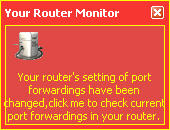
Last article,we mentioned that port forwarding is not security sometime.Some spy software maybe will add a port mapping into your router and threat your security of your computer.So monitor port forwarding settings of your computer is very import.


With port forwarding wizard,what you need to do is just enable "Monitor router" option and Port Forwarding wizard will auto monitor your router for you.If your router's port forwarding settings have been changed,it will let you know.


****************************************

Best,upRedSun

http://www.upredsun.com

Powerful Port Forwarding,make your port forwarding easy now!****************************************

Thursday, May 22, 2008

Manually port forwarding VS Automatically port forwarding

Anyone can configure a router for port forwarding, but it's a manual process that's usually not simple, and it's a process that differs for each different model of router. There are a few websites out there that centralize instructions for configuring most common routers -- the best of these is probably www.PortForward.com. Take a look at that site, and you'll see the great variety in instructions for configuring routers to port-forward incoming connections.

UPnP technology makes it easier to configure routers for port forwarding and NAT traversal, since the configuration can be done programmatically for you, without manual steps from you. Port Forwarding Wizard takes advantage of UPnP technology to create a utility that allows you to view current port mappings, and add, or delete them.

Before you use "Router Management" function of Port Forwarding Wizard,what you need to do is just enable your router's UPnP option.

****************************************
Best,upRedSun
http://www.upredsun.com
Powerful Port Forwarding,make your port forwarding easy now!****************************************

Security issue when port triggering

When you port triggering use some tool,that mean you start a service that everybody can access this port triggering service.Specially when you deploy port triggering service on a computer that have a public ip.This port triggering service will let internet user access your computer that locate in a private LAN.It is very useful when your are using some P2P tool like utorrent.But at the same time,this port triggering expose your computer under a great risk,because users from internet can attack your computer.

Using Port Forwarding Wizard,when you add a port triggering service,you can make a white ip list and a black ip list.If someone try to access your port triggering service,Port Forwarding Wizard will check the ip and if it is illegal,Port Forwarding Wizard will refuse the access to make your computer safe.

****************************************
Best,upRedSun
http://www.upredsun.com
Powerful Port Forwarding,make your port forwarding easy now!****************************************

Wednesday, May 21, 2008

How to check if port mapping is ok?

When you use Port Forwarding Wizard add a port mapping into router or deploy Port Forwarding Wizard on a computer that have a public ip and start a port mapping.How do you check if port mapping work fine.

This is a tool for you,http://www.yougetsignal.com/tools/open-ports/

****************************************
Best,upRedSun
http://www.upredsun.com
Powerful Port Forwarding,make your port forwarding easy now!****************************************

Integrating with port forwarding and port triggering

There are a lot of port forwarding tools or port triggering tools,but these tools are just have port forwarding function or just have port triggering function.There is no such tool that integrating with port forwarding and port triggering on this market now!

Port Forwarding Wizard fill in the market's blank.It has both port forwarding and port triggering function.

If you want to done port mapping with your router,there is a "Router Management" function,it can let you fetch, add and delete port mappings on router directly without logining into router. And if you want done port mapping without your router,that's ok too.you can just deploy Port Forwarding Wizard on a computer that have a public ip,after this,what you need to do are just two steps.The first step is add port mapping,the second step is start port mapping and you are done.It is very easy!

****************************************
Best,upRedSunhttp://www.upredsun.com
Powerful Port Forwarding,make your port forwarding easy now!****************************************

Tuesday, May 20, 2008

Learn how to know your computer and router's ip

Some time you want to know your computer's ip,you can just click the windows "Start" menu and click "Run" sub-menu,you can see a dialog,type "cmd" and click enter,you will see a command windows,then type "ipconfig -all",you will see your computer ip.

If you want to know your router's ip,then you should login into your router and check the ip.Port Forwarding Wizard will add a tool let you directly know your router's ip withou logining into your router.

****************************************
Best,upRedSun
http://www.upredsun.com
Powerful Port Forwarding,make your port forwarding easy now!****************************************